Streamlining healthcare clinic check-ins
ROLE
Product Designer
TIMELINE
4 Weeks
YEAR
2025
RESPONSIBILITIES
User research, User flows, Wireframing, UI design, Prototyping, Usability testing
THE TLDR
Chrona is a check-in app designed to rethink the clinic experience for patients, staff, and doctors
A mobile check-in concept designed to streamline the clinic experience for patients, front desk staff, and doctors. Patients pre-check-in from their phone, carry a single health record across providers, and track their place in the waiting queue in real time, reducing paperwork, wait time frustration, and administrative load for everyone involved.
PROBLEM
The check-in experience hasn't kept up with what technology can do
Clinics need a solution built for them, not adapted for them
Clinics rely on third-party systems that are often built for global markets and not specifically shaped around US healthcare needs. The result is a process that works well enough but creates unnecessary friction in the form of long waits, repeated paperwork, and front desk staff managing data entry instead of patient care. When a doctor runs behind, staff have no way to set expectations and patients have no visibility into where they stand.
THE CHALLENGE
How might we streamline the check-in experience so patients spend less time waiting and more time being seen?
UNDERSTANDING
Designing for everyone who walks through the door
PAIN POINT
Waiting without context
Not knowing how much longer you'll need to wait is a different experience than knowing you're next in line.
PAIN POINT
Paperwork slows things down
Handwriting forms on arrival adds time to every visit.
PAIN POINT
Front desk staff absorb friction
Data entry, insurance verification, and frustrated patients whose wait is running long.
SOLUTION
Simple enough for anyone, useful enough for everyone
The Patient
Wants a fast, simple experience without repeating themselves or waiting longer than necessary.
The Front Desk
Wants less time on data entry and more time focused on the people in front of them.
The Doctor
Benefits when patients arrive prepared and forms are already complete — less time catching up, more time on care.
Clinics need a solution built for them, not adapted for them
Most check-in tools digitize the existing process without rethinking it. Chrona was designed around what patients, staff, and doctors actually need. Pre-check-in from your phone eliminates paperwork on arrival. A single health record that travels with the patient removes the need to re-enter information at every new provider. Real-time queue visibility addresses the frustration of waiting without context. And in-app messaging keeps communication open before and after the appointment without requiring an unnecessary visit.

Check in before you arrive
Patients complete forms at their own pace from their phone without clipboards, waiting room paperwork, or time pressure on arrival.

One health record, every clinic
In Chrona, patients input their information once and it carries with them. When a new clinic uses the app, forms are autofilled automatically. Patients control what they share and with whom.
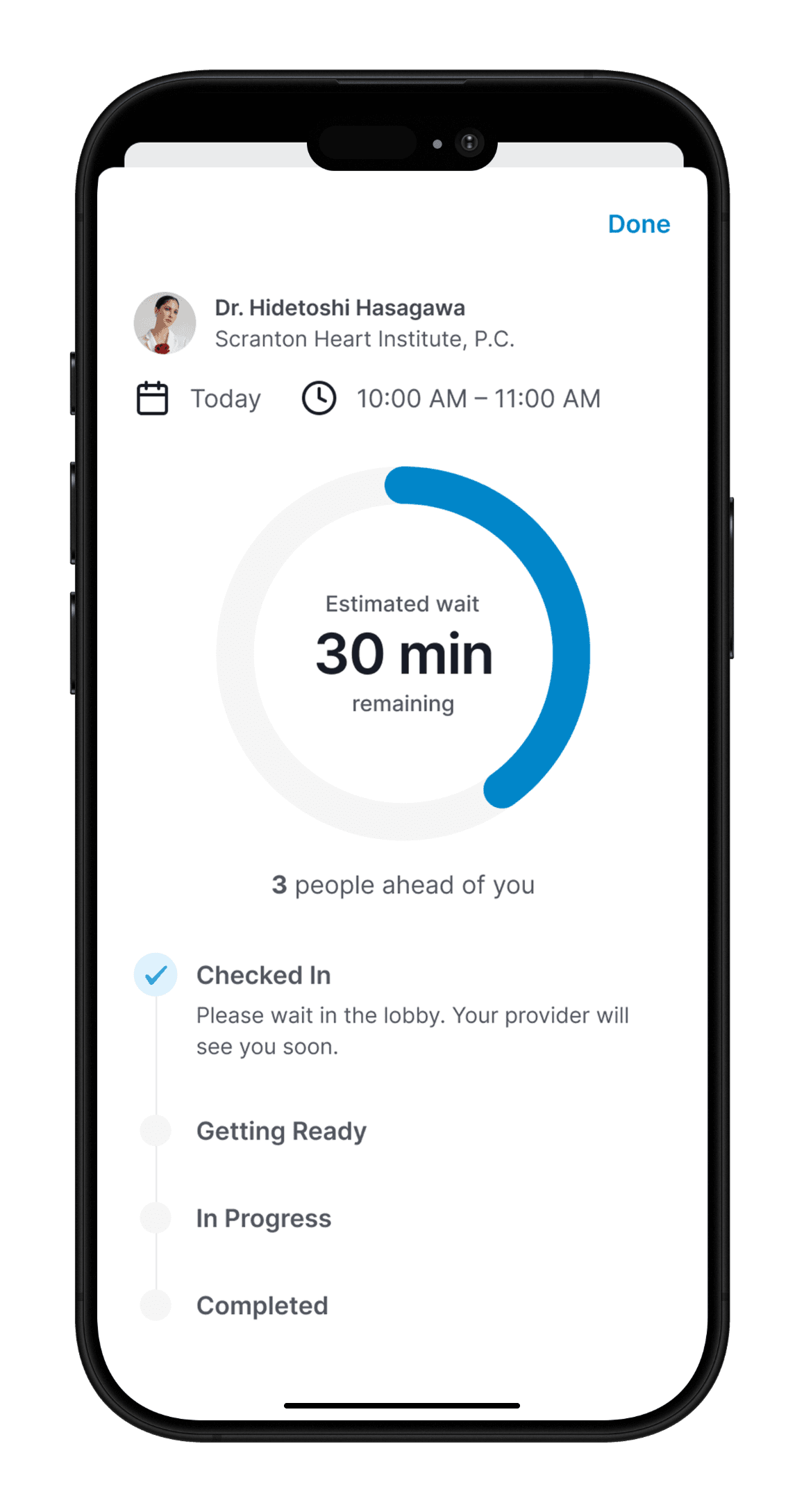
See exactly where you are
A real-time status tracker shows patients where they are in the process from check-in to being called in, removing the uncertainty of the waiting room entirely.
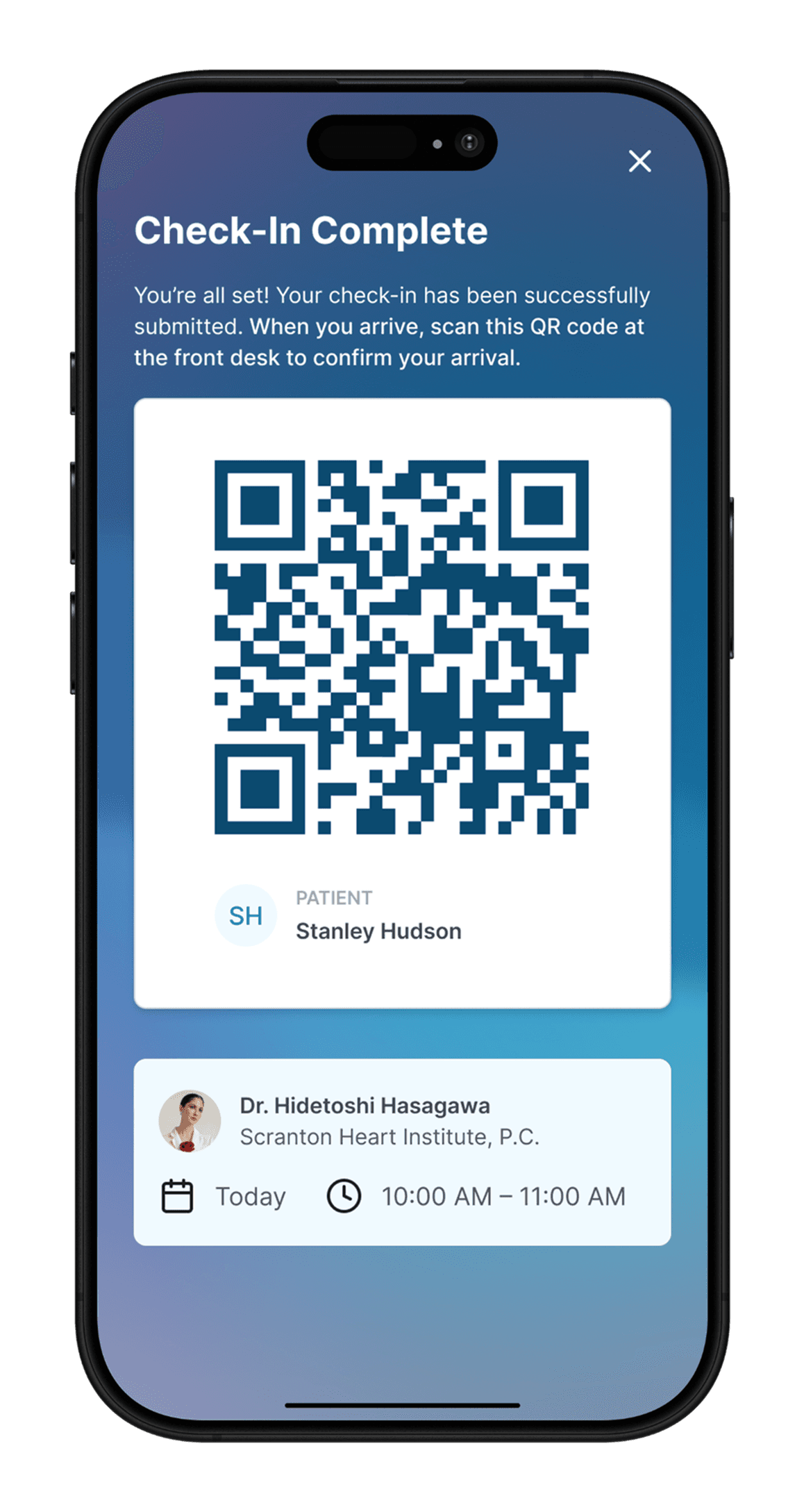
Arrive and scan
A QR code on arrival lets staff know the patient is there. No lines, no forms, no interaction required unless the patient wants it.
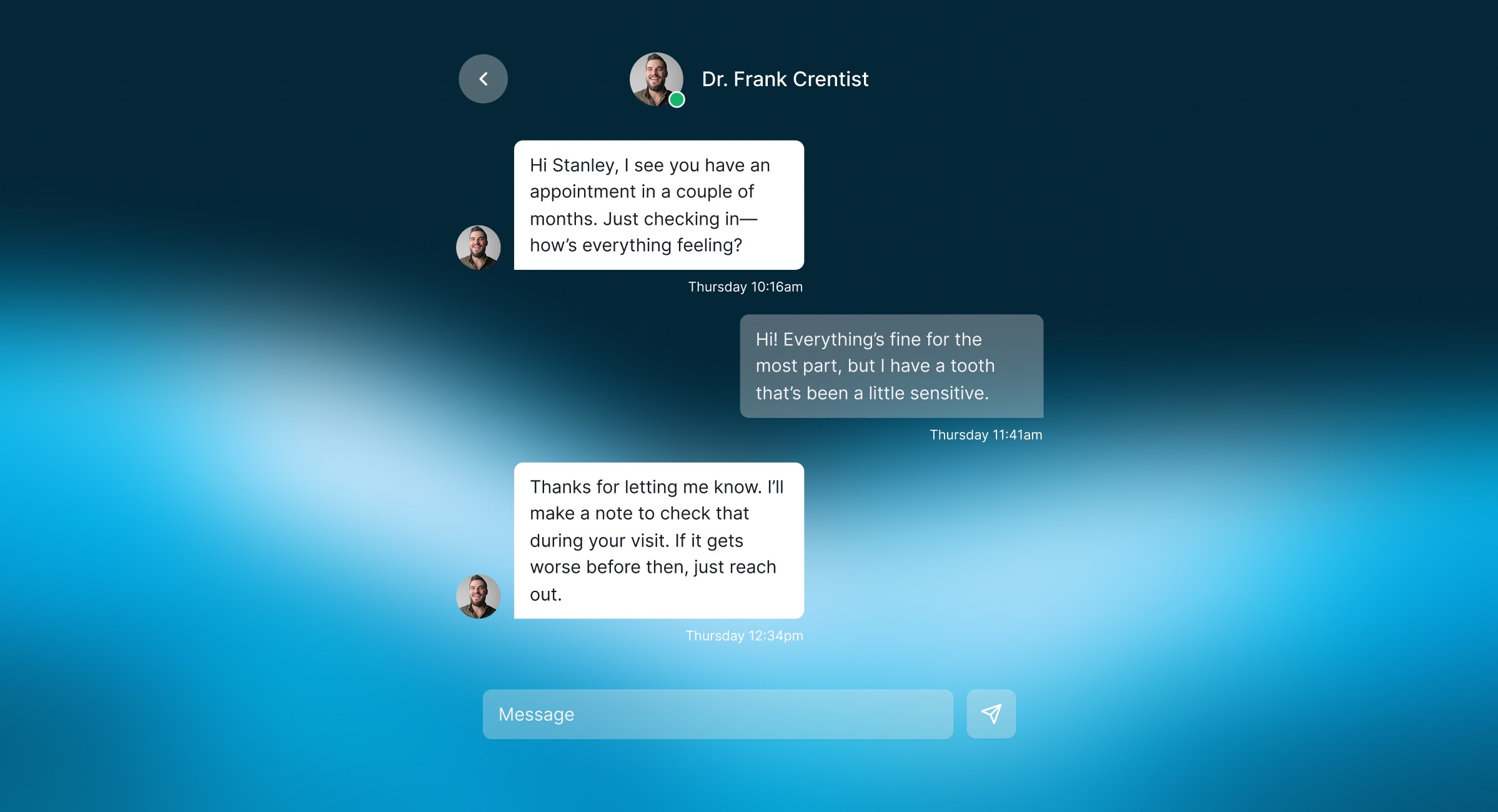
Stay connected without coming in
In-app messaging gives patients a way to ask quick questions, receive appointment reminders and updates before they arrive, and share feedback after. Unnecessary visits are reduced and communication is clear on both sides.
PRODUCT THINKING
Simplicity was the design constraint, not just a goal
Designing for low tech comfort
The target audience included patients who might not be confident with technology, like older adults, people who don't use smartphones frequently, anyone who finds new apps intimidating. Every decision I made had to hold up against that use case. If it wasn't simple enough for someone uncomfortable with technology, it wasn't simple enough.
Competitive tools missed the edge cases
Existing solutions such as urgent care kiosks and portals like MyChart tended to design for the average user and break down at the edges: tech-anxious seniors, late arrivals, parents managing multiple check-ins. I saw an opportunity to design something that accounted for those scenarios from the start rather than treating them as exceptions.
Privacy as patient control, not just compliance
In a real product, HIPAA compliance would shape every architectural decision. Even as a concept I designed with those constraints in mind so patients decide what they share and who can access it. Giving patients visible control over their own data addresses both the legal and emotional side of trusting a new system with sensitive information.
Taking design cues from iOS Settings
The medical history section was directly inspired by Apple's iOS Settings such as grouped content, clear hierarchy, and a push navigation pattern where tapping into a section layers the new view over the previous one, keeping the parent screen partially visible behind it. Getting that interaction right in Figma required deliberate prototyping work, but it was the right call for a flow involving sensitive inputs.
Blue wasn't arbitrary
Trust, calm, and professionalism are associations that matter when users are sharing sensitive health information. Blue is used across medical branding for a reason, so I leaned into that intentionally rather than trying to differentiate through color in a space where familiarity is an asset.
TESTING & REFINEMENT
What usability testing surfaced
I tested with five participants across different ages and tech comfort levels, giving each realistic tasks like checking in for a tomorrow's appointment or updating insurance information.
Tap targets needed to be larger
Participants struggled with precision on mobile, especially for those with lower tech comfort. I increased button heights from 44px to 56px and added more spacing around interactive elements.
Users wanted reassurance about saving progress
Multiple testers hesitated before leaving a partially completed form. An auto-save indicator "Draft saved" gave confidence that progress wouldn't be lost.
The progress bar reduced anxiety
Participants appreciated knowing how many steps remained. Seeing the end in sight made the form feel manageable rather than open-ended.
Form language needed simplification
Medical terminology confused some users. Labels like "Primary Care Physician" became "Your Main Doctor" and helper text was added throughout.
REFLECTION
What I walked away with
Simplicity is harder than complexity
Designing for someone who might not be comfortable with technology meant every screen had to earn its place. The constraint made every decision more intentional.
Design the whole journey, not just the screens
Every decision had implications beyond the interface like data privacy, re-entry flows for returning patients. Thinking system-wide rather than screen-wide was the an important shift in this project.
What I'd build next
A tablet and web version for broader accessibility, integration with EHR systems like Epic or Cerner, and field research at actual clinics to observe real workflows in context.