Turning passive job tracking into an active search strategy
ROLE
Product Designer
TIMELINE
Apr - May 2026
TEAM
TOOLS
Claude Code
Figma
Vercel
THE TLDR
Job searching is time-consuming, discouraging, and easy to lose track of. What worked years ago barely makes a dent now, and many job seekers spend over six months before gaining any real traction. Applytics is a job application tracker designed to help job seekers search more strategically, suggesting follow-up tasks, surfacing insights on their pipeline, and storing commonly used links and documents to reduce the friction of applying.
5
Time zones
7
Weeks
13
Screens built
PROBLEM
Most trackers log applications but don't help you take action
This project started with a simple brief: build a job tracker. It was part of a collaborative program that brings together designers and developers to solve real problems. Most trackers are essentially elaborate spreadsheets that log applications but don't do much beyond that. They don't tell you when to follow up with recruiters or hiring managers, surface patterns in your pipeline, or account for the fact that different job seekers have completely different strategies.
THE CHALLENGE
How might we help job seekers stay organized and take action without adding more noise to an already overwhelming process?
UNDERSTANDING
What job seekers actually struggle with
Through conversations with job seekers and observations from LinkedIn and job search communities, the same frustrations kept surfacing regardless of industry, experience level, or search strategy.
Friction is in the repetition
Copying and pasting the same links into every application form is a small frustration that compounds quickly across dozens of applications.
Conflicting advice
Coaches, influencers, and well-meaning family members all give different guidance, and what worked a few years ago may not apply today.
Rejection is hard to deal with
Large-scale rejection is discouraging. Without visibility into patterns, it's hard to know whether to keep going or rethink the strategy entirely.
Two distinct approaches emerged
Most job seekers naturally fall into one of two modes. Volume appliers focus on sending out as many applications as possible and tracking where things drop off. Relationship builders focus on quality over quantity, nurturing connections and following up deliberately. Most tools only support volume appliers because that's how the job search process has been until recently, leaving the relationship builders without what they need.
I can honestly tell how needed something like this is. I’m currently job searching myself, and my applications are scattered across LinkedIn, Google Sheets, notes, and emails, so having a dedicated tracking system feels incredibly valuable.
User research participant
DESIGN APPROACH
Finding the right way to work with AI
What I tried first
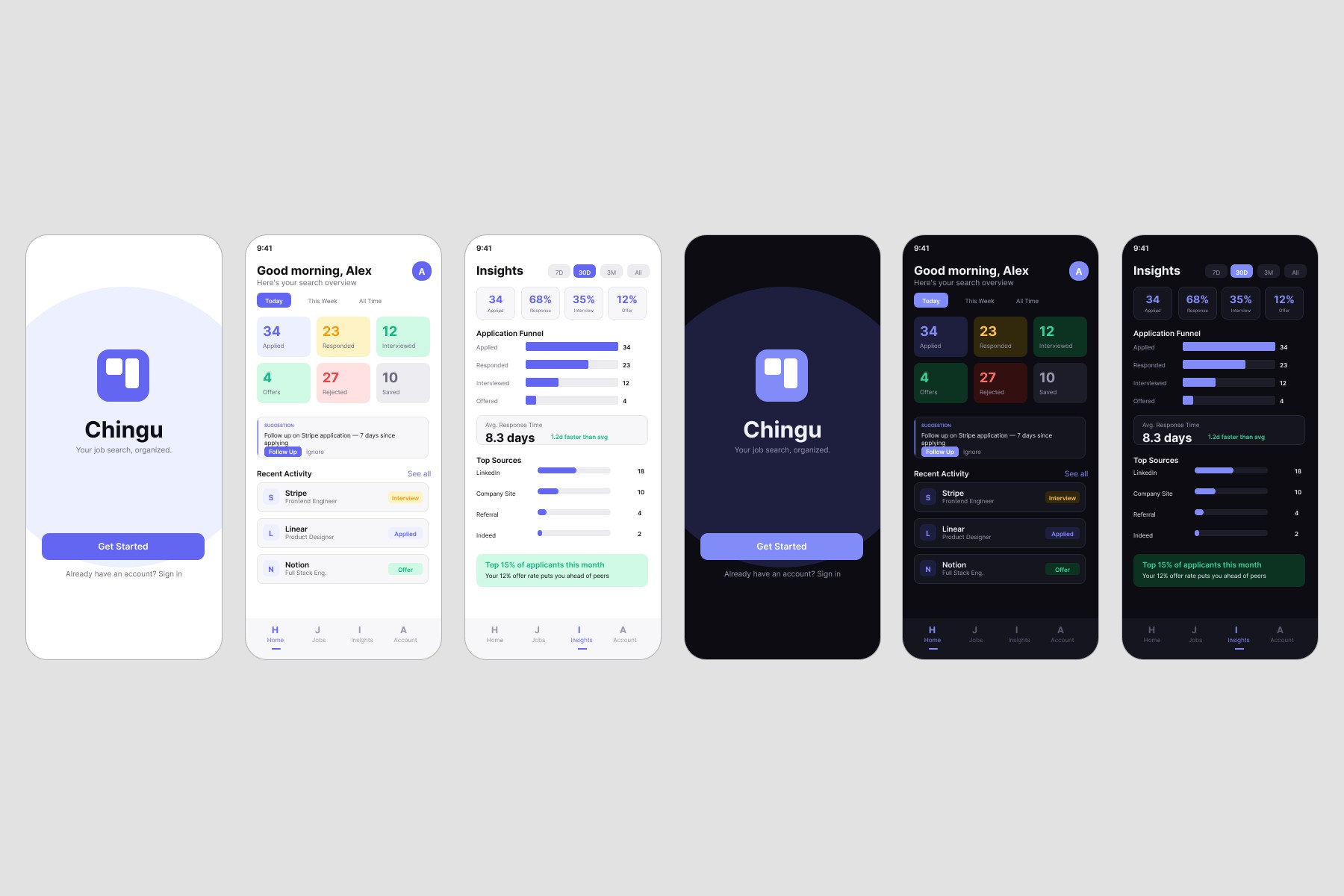
claude's hifi output: cluttered typography, oversaturated and muddy colors, unnecessary information/features.
I spent more time (and tokens) correcting Claude's output than I spent actually creating
I tried again by asking Claude to convert the lofi screens to hifi using Robinhood, Linear, Stripe, and Notion as inspiration. The output was still generic. It fleshed out the structure but didn't absorb the visual language I described. I added a design system and asked Claude to apply it, but it carried over unstyled lofi components and what it did apply didn't look right.

mini design system
A better approach
I noticed early on that Claude defaulted to building locally before I'd specifically asked it to work in Figma. Combined with conversations I'd been following on X about what people were building with AI directly in code, I decided to try this approach. I started a new terminal session with a detailed prompt covering product purpose, core pages, color palette, style, target audience, vibe, and key UI elements.
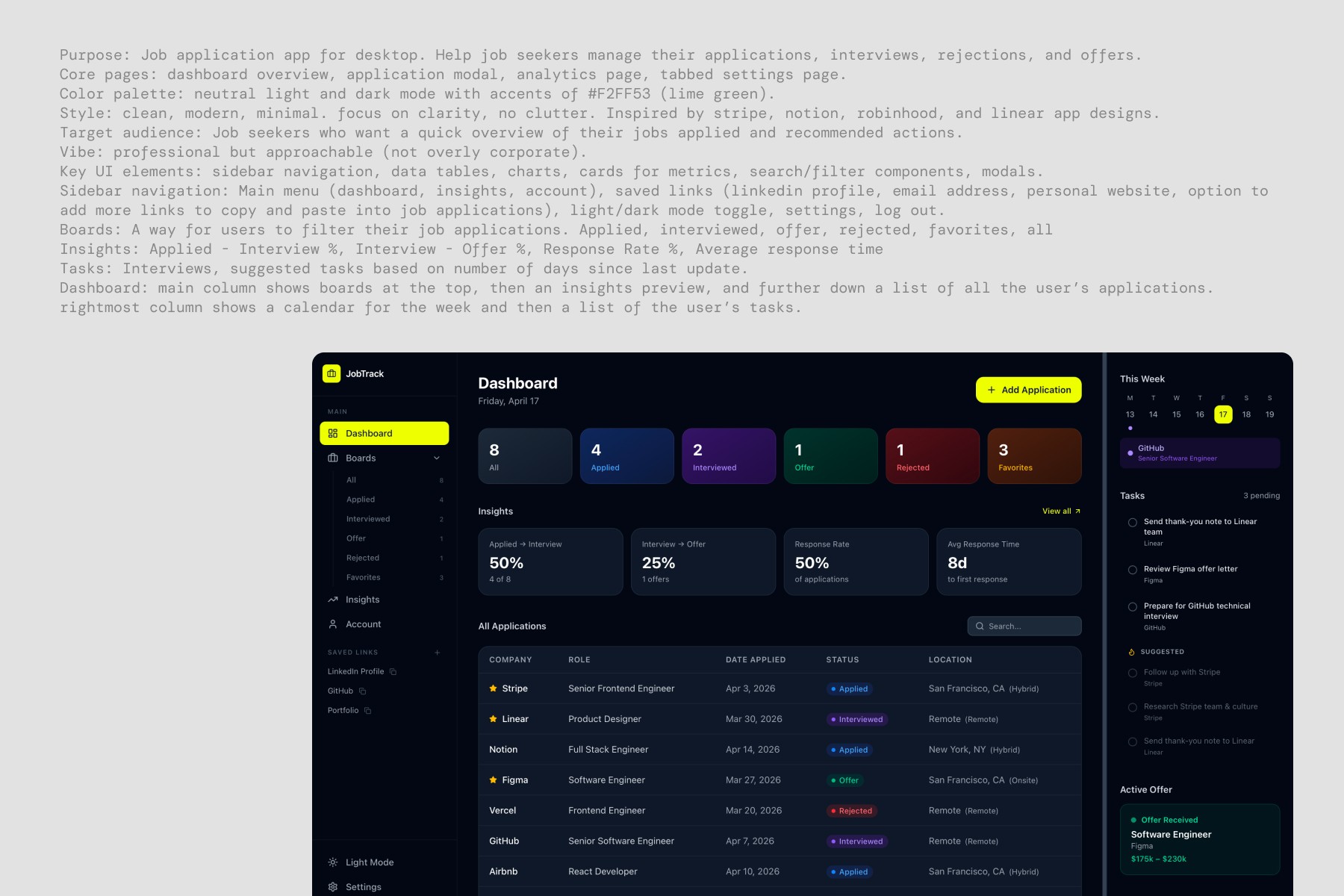
my input and claude's output. i documented the initial demo on x
Validating every output against my vision

Process Impact
The Terminal approach produced a more accurate result in roughly 60% less time than the Figma MCP and manual wireframing combined.
ITERATION & REFINEMENT
Learning to speak Claude Code's language
Strategic prompting by identifying "why"
With the layout solid I moved into color and visual details. No matter how specific my prompts were, colors kept reverting to generic defaults. I used a separate conversational Claude session to diagnose the problem, which is how I discovered Tailwind utility classes were overriding my CSS changes. Once I had a prompt targeting those overrides the process accelerated significantly, and understanding the "why" changed how I approached prompting from then on.
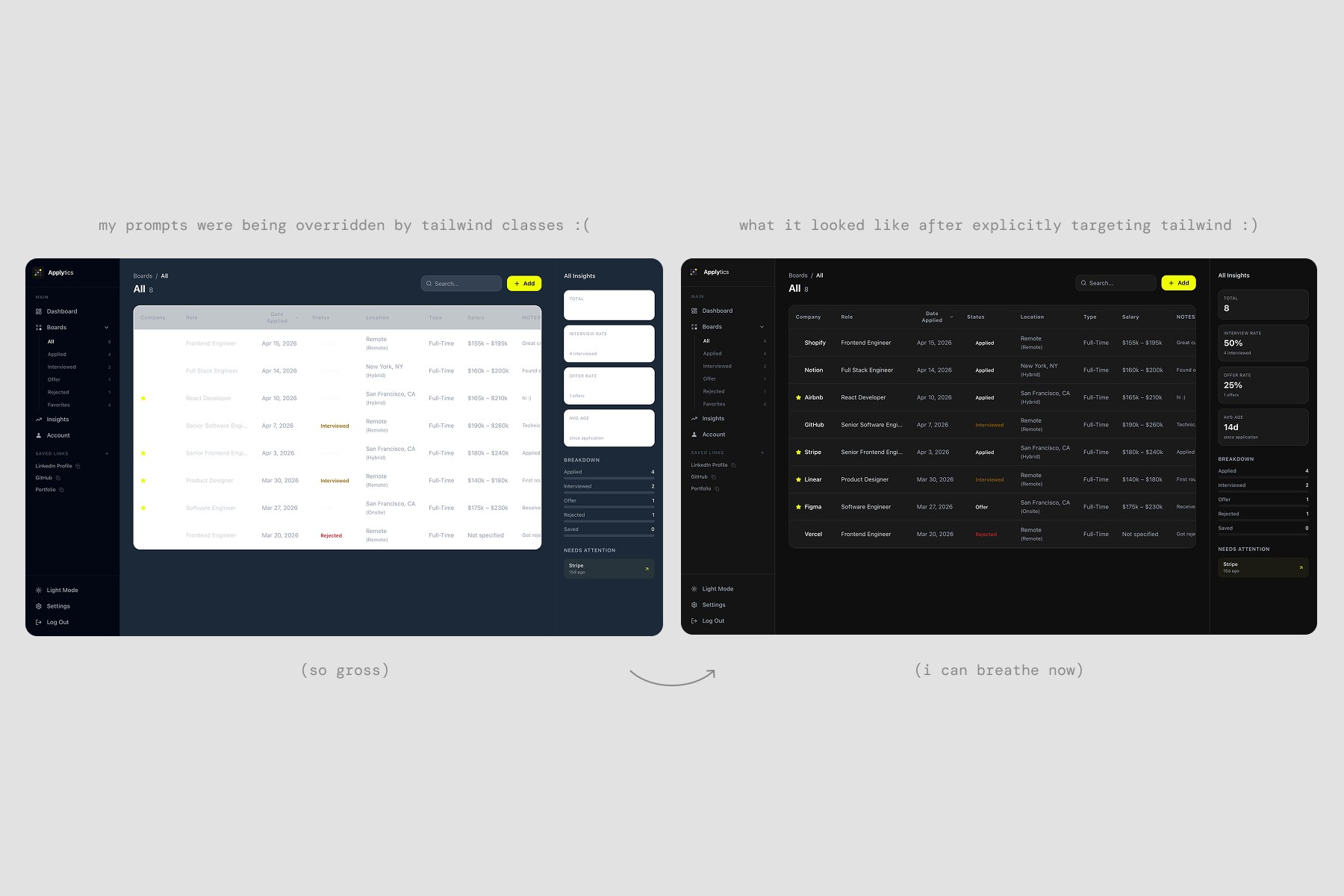
How my prompts evolved
HANDOFF & QA
Where design decisions meet real constraints
Unifying what drifted
What shipped
Despite sharing a design system, colors varied page to page and components differed depending on who built them. I stepped in to facilitate visual unification across each developer's work before the deadline.
What to improve
User testing surfaced a few specific areas worth addressing in the next iteration such as adding a logout confirmation step and revisiting the information architecture around Account and Settings which testers found overlapping and unclear.
What's next
The task system, URL parser, and a simplified mobile experience didn't make it into the MVP but are planned for future iterations. Testers also surfaced feature ideas worth exploring like a ghosted application status, trend surfacing to help users identify patterns in where they're seeing success, and a profile matching feature to help users evaluate role fit before applying.
Anthony Tibamwenda, developer
REFLECTION
What I walked away with
Come in with a clear vision
The more defined my direction before prompting, the less time I spent correcting output and the more accurate the result.
Not everything can be prompted
I stopped prompting for things it couldn't do and started filling those gaps myself once I understood where AI adds value and where it falls short.
Structure enables speed
Clear ownership and communication expectations from day one would have made the whole project move faster.
Knowing when to push further, when to step in, and when to try something different entirely is what makes this workflow actually work.